Controlling public access to your help center
Public reading requires all three conditions: the article is published, its collection is visible to readers, and Help Center is enabled on the portal. Seeing an article in the dashboard or opening its preview does not mean ordinary readers can access it.
Enable Help Center on your portal
Open Settings → Portal in the dashboard. Under Modules on the portal, turn on Help Center. This switch saves directly; the separate save button below belongs to the welcome message.
The switch is unavailable until you create a collection. Create one, then return to this setting. For readers to see articles, the collection must also be visible and contain published articles.
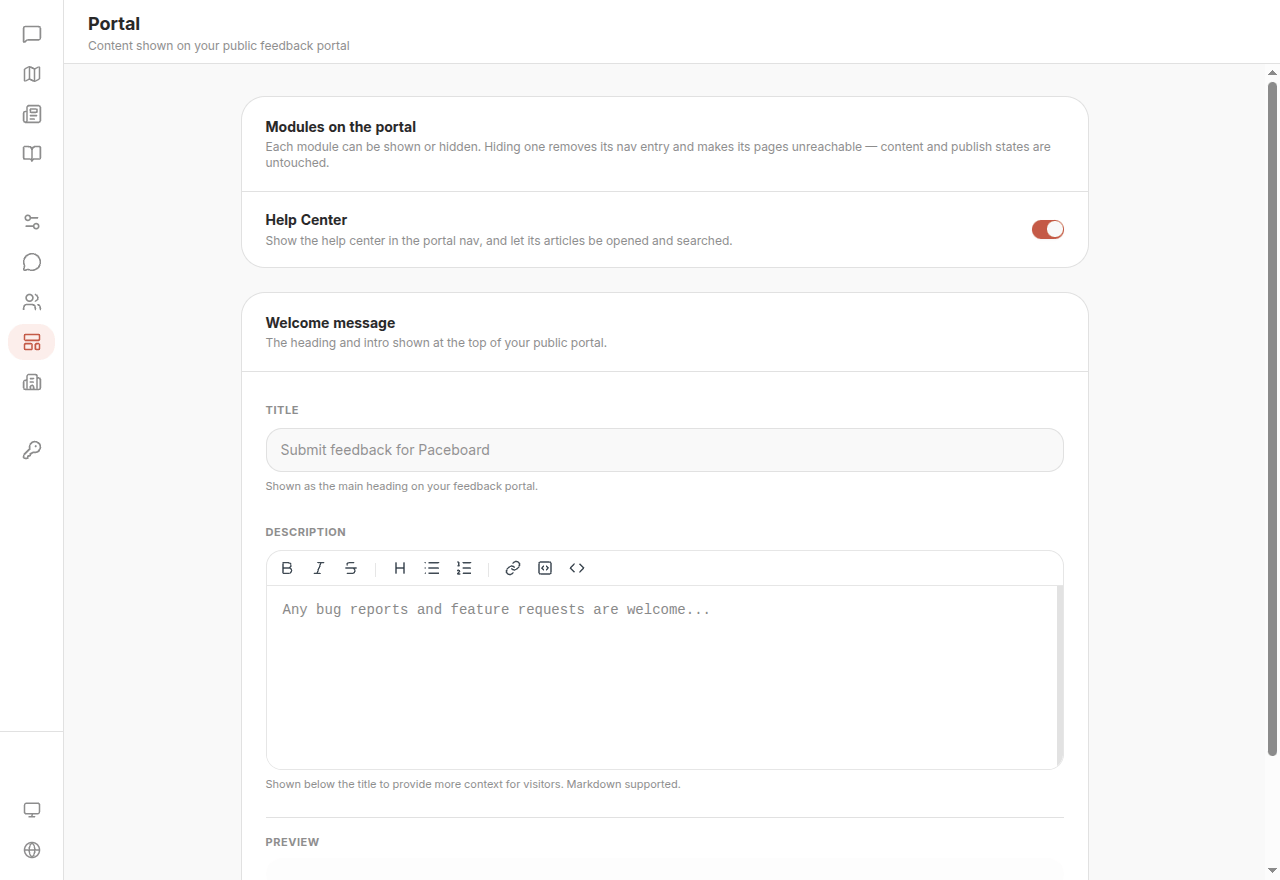
The public portal then includes a Help Center navigation entry at /help on your FeedLog site. Readers can browse collections, search articles, and open the full text.
Turning the switch off removes the entry and makes help center pages, articles, and search unavailable. It does more than hide navigation. Saved content and publication states remain in the dashboard.
Check a published article that will not open
| Check | Where to look | What to do |
|---|---|---|
| Article status | Help Center list or article editor | Publish draft or archived articles |
| Collection visibility | Collection ellipsis → Edit collection | Turn on Visible to readers and save |
| Portal setting | Settings → Portal | Enable Help Center |
| Organization and link | Article URL in the editor | Copy the actual link from the correct organization, avoiding another demo or test workspace |
For example, an article can show Published while its collection is hidden. Readers still receive 404. Publishing it again will not fix this; restore the collection's visibility.
After restoring access, open the actual link in a signed-out window to check the reader experience. Dashboard preview is not a substitute for this check.
Temporarily take content offline
| Scope | Action | Restore access |
|---|---|---|
| One or several selected articles | Unpublish the articles | Publish them again |
| A collection and all its articles | Turn off Visible to readers | Turn it back on; articles must still be published |
| The entire public help center | Disable Help Center on the portal | Enable it again; collections and articles must still meet the public access conditions |
These actions retain your content. You do not need to delete articles or collections just to take them offline. Deleting a collection also deletes every article inside it.
Public reading and Agent usage are separate
Hiding a collection, unpublishing an article, or disabling Help Center on the portal does not disable AI usage. Articles with Allow AI usage enabled can still inform customer-facing answers, without a publicly accessible article citation.
To stop Agent from reading the material, separately disable AI usage. Answers already sent to customers are not retracted.
Common questions
The feedback portal works, but the Help Center entry disappeared. Check the portal module switch, then check whether visible collections contain published articles.
An Agent answer has no article card. Nonpublic articles can inform answers but cannot be public citations. A missing card does not prove that an article was not used; check its AI usage setting.